A recorded live stream is a clever hybrid that gives you the polish and reliability of a pre-recorded video, but with the real-time buzz and audience interaction of a live event. This technique, also known as simulive, lets you broadcast a perfectly edited video at a scheduled time, allowing your entire community to watch and engage together as if it's all happening in the moment.
Understanding the Recorded Live Stream
Think of it like a movie premiere. The film was shot, edited, and perfected months ago, but the magic happens when everyone gathers in the theater to experience it together for the first time. That's the core idea behind a recorded live stream. You’re taking a high-quality, pre-produced video and turning its debut into a shared, can't-miss event.
This approach gives you the best of both worlds. You get the community excitement and FOMO (fear of missing out) that comes with a live broadcast, but without the stress of potential technical disasters, on-camera mistakes, or a spotty internet connection. For any brand or creator, this means you can deliver a flawless, professional presentation every single time.
The Best of Both Worlds
The real genius here is separating the content from the event. The content is produced ahead of time, ensuring it's as good as it can possibly be. The event is the scheduled "premiere" where your community comes together to watch.
Instead of your team frantically managing a live feed and hoping nothing goes wrong, they can focus entirely on what makes a live event so valuable: the audience. Your speakers, hosts, and experts can jump right into the live chat to answer questions, respond to comments, and fuel the conversation, creating an experience that feels deeply personal and interactive.
By broadcasting pre-recorded content as a live event, you ensure a higher-quality production and reduce the risk of errors or technical issues, providing a superior viewing experience for your audience.
Why It Matters More Than Ever
Let's be honest, audience expectations for video are sky-high. A choppy, awkward, or glitch-filled live stream can do more harm than good for your brand. A recorded live stream virtually eliminates these risks.
This method guarantees your message comes across exactly as you planned—with sharp graphics, clear audio, and perfect pacing. To see a full breakdown of how it compares, check out our guide on the pros and cons of live versus pre-recorded video.
Ultimately, using a recorded live stream elevates a simple video into an appointment-viewing experience. It builds anticipation and fosters a genuine sense of community that a standard video-on-demand upload just can't match.
Choosing Your Video Broadcast Format
Picking the right video format is like picking the right tool for a job. You wouldn't use a hammer to turn a screw, right? In the same way, deciding between a true live stream, a standard on-demand video, or a recorded live stream really comes down to what you want to achieve. It all depends on your goals for engagement, quality, and how much risk you're willing to take on.
Each of these formats has its own superpower. A true live stream gives you that raw, in-the-moment connection that’s impossible to fake. Video-on-demand (VOD) offers polish and convenience for your audience. Then you have the recorded live stream—or simulive—which carves out a fantastic middle ground, borrowing the best traits from both.
Getting a handle on these differences is the first real step to building a video strategy that actually works. Let's break down how they stack up.
Comparing the Core Video Formats
To make the right call, you have to see the trade-offs clearly. One format might put audience interaction front and center, while another is all about delivering a flawless, mistake-free message. So, ask yourself: what’s more important for this project? Spontaneous energy or controlled perfection?
Your answer will shape everything that follows, from how you produce the video to what your team is doing during the broadcast itself.
At its core, the decision comes down to this: how much do you value unscripted, real-time interaction versus the safety and polish of a pre-recorded video? Your answer will almost always point you to the right format for your event.
To make this even simpler, the table below gives a side-by-side look at the three main ways to broadcast video. It's a quick cheat sheet for understanding the pros and cons of each approach.
Comparison of Video Broadcasting Formats
A feature-by-feature comparison of Recorded Live Streams (Simulive), True Live Streams, and Video-On-Demand (VOD) to help choose the right format for your needs.
| Feature | Recorded Live Stream (Simulive) | True Live Stream | Video-On-Demand (VOD) |
|---|---|---|---|
| Production Risk | Low: Content is perfected in advance, eliminating technical glitches or speaker errors. | High: Vulnerable to internet issues, equipment failure, and on-air mistakes. | Very Low: Complete control over editing and final output. |
| Quality Control | High: Full post-production control for graphics, editing, and audio. | Low: What happens live is what the audience sees, mistakes and all. | Highest: The final product is polished and can be re-edited anytime. |
| Audience Interaction | High: Real-time chat, polls, and Q&A managed by a live team while the video plays. | Highest: Presenters can respond to viewer comments and questions live on camera. | Low: Interaction is asynchronous through comments left after viewing. |
| Setup Complexity | Medium: Requires video production upfront and platform setup for the scheduled broadcast. | High: Demands a stable setup, robust internet, and real-time technical management. | Low: Simply upload the finished video file to a hosting platform. |
| Presenter Stress | Low: Speakers can record their parts multiple times to get them perfect. | High: The pressure of a live, one-take performance can be significant. | Very Low: No pressure of a live audience; recording is done privately. |
With the key differences laid out, you can see how each format is purpose-built for different scenarios. The best choice becomes much clearer when you match the format's strengths to your specific content and goals.
Which Format Should You Use?
Okay, now that you can see the pros and cons, let's connect them to the real world. Here’s a quick guide to help you decide.
Choose a True Live Stream for... Anything where spontaneous interaction is the whole point. Think AMA (Ask Me Anything) sessions, breaking news, live sports, or Q&A-heavy events. That raw, unedited feel is what builds trust and excitement.
Choose Video-On-Demand (VOD) for... Content that has a long shelf life. This is your go-to for evergreen tutorials, course materials, and product demos. VOD is perfect for building a library of resources your audience can watch whenever they want.
Choose a Recorded Live Stream for... High-stakes events where the message has to be perfect, but you still want that "live event" buzz. This is the sweet spot for product launches, major company announcements, polished webinars, and virtual conferences. You get total quality control and a shared, high-energy viewing experience with live chat.
As you plan your broadcast, remember to check the rules of the platforms you'll be using. Different platforms have their own quirks and limitations, so it pays to do your homework on things like Instagram video length limits, including live streams to make sure your content will work. A little research upfront can save you from a major technical headache later.
Ultimately, the best format is the one that fits your resources, lowers your stress, and gives your audience the exact experience they’re looking for.
Why You Should Consider Recorded Live Streams
Deciding to use a recorded live stream, or "simulive," isn't just a technical choice. It's a strategic move that helps you create polished, high-impact events without the all-too-common stress of a traditional live broadcast. The biggest win? You practically eliminate risk.
Think about everything that can go wrong during a live event: your internet connection drops, a speaker gets flustered, your dog starts barking, or the presentation suddenly won't load. With a pre-recorded broadcast, those potential disasters are already handled. You're not crossing your fingers hoping for the best; you're sharing a perfect, edited final cut every single time.
This level of control lets you sidestep the chaos that can derail even the most carefully planned live show. It ensures your message and your brand come across exactly how you want them to.
Take Your Production Quality to the Next Level
Once you remove the fear of making a mistake in real-time, you can focus on making your content truly shine. Pre-recording gives you the full power of post-production, a luxury you simply don't have when you're live. You can snip out awkward pauses, tighten up the pacing, and make sure the whole presentation flows perfectly.
It’s your opportunity to add those professional touches that really make a difference for the viewer:
- Polished Graphics and Overlays: Add in lower thirds, branded intros, or calls-to-action that pop up at just the right second.
- Flawless Audio and Video: You can fix the color, get rid of background hum, and make sure every speaker sounds like they're in a professional studio.
- Dynamic Camera Angles: Cut between different shots to create a more engaging, TV-style production instead of a static one-person webinar.
This isn't just about looking professional; it's about holding your audience's attention. Perfecting your content beforehand transforms a simple stream into a high-quality viewing experience.
Free Up Your Team to Focus on Engagement
One of the best operational shifts that comes with a simulive event is how it changes your team's focus. Your presenters no longer have to worry about talking, managing slides, and checking the chat all at once. They can record their part whenever they feel most prepared, which is a huge relief.
When the broadcast actually goes "live," your team isn't scrambling to fix technical glitches. Instead, they can focus entirely on what makes these events special: engaging with the audience.
With the video playing on autopilot, your experts and moderators can put 100% of their energy into the live chat. That’s where the real connection happens—they can answer questions, start conversations, and make everyone feel like they’re part of the event.
This approach actually makes the event more interactive. The live chat becomes the centerpiece, building a real sense of community around your perfectly delivered content.
Reach a Global Audience Without the Headaches
Finally, going simulive smashes through time-zone barriers. You don't have to pick one "perfect" time that's inevitably inconvenient for a huge chunk of your audience. You can schedule the same recorded stream to air multiple times, targeting peak viewing hours in North America, Europe, and Asia.
This strategy helps you maximize your reach and lets everyone feel like they're part of a timely, shared experience. And people are definitely watching—about 28.5% of internet users tune into live streams every week, and they stick around for an average of 25.4 minutes. That shows just how powerful these scheduled events are. You can dig into more stats on the explosive growth of live streaming viewership.
By using a recorded live stream, you can tap into this massive audience, delivering a flawless event to people all over the world, right when it works best for them.
Your Step-by-Step Simulive Production Workflow
Pulling off a great recorded live stream is a bit like directing a play. The real magic happens in rehearsal (pre-production), not on opening night. You perfect the performance, set the stage, and then, when the curtain rises, the show goes off without a hitch.
Let's walk through the whole process, from the first spark of an idea to the final audience comment.
Phase 1: Pre-Production and Filming
This is where you lay the groundwork. Honestly, a well-thought-out pre-production phase is the single biggest factor in whether your stream looks professional or amateur. It’s your chance to get the story straight and iron out any on-camera jitters before anyone sees it.
Scripting and Storyboarding: Start by outlining your content. A solid script or even a simple storyboard keeps your presentation tight, engaging, and on-point. This isn't about sounding stiff; it's about building a logical flow that makes sense and respects your viewers' time.
Filming the Content: Find a quiet, controlled space to record your video. Get your lighting right, make sure the audio is crystal clear, and check what’s in the background. The beauty of not being truly live is that you can do as many takes as you need to nail the delivery.
Gathering Assets: Pull together all your graphics, lower-third titles, intro and outro clips, and any other visuals you plan to use. Having all these files organized and ready to go makes the editing process so much smoother.
Phase 2: Post-Production and Polish
You've got the raw footage. Now it's time to turn it into a broadcast-worthy event. Post-production is where you take a perfectly good recording and make it great, adding the professional sheen that sets you apart.
This is your chance to edit out any "ums" and "ahs," tighten up the pacing, and make sure the audio is perfect. You can weave in your graphics, add some background music, and just generally make the whole thing look and sound fantastic. The end goal is a single, polished video file that's ready for its big debut.
The real superpower of the simulive model is perfecting your content in post-production. You can guarantee every transition is seamless and every key point lands exactly as you intended—something that’s simply impossible in a live-to-air broadcast.
Phase 3: Technical Setup and Scheduling
Okay, time to switch hats from content creator to event producer. This phase is all about getting the technical backend ready to deliver your polished video to a live audience.
Platform Selection: You'll need to pick a simulive platform that fits your needs. Look for a service that lets you upload your finished video and schedule it to broadcast as a live stream to places like YouTube, Facebook, or LinkedIn. For a deeper dive, you can check out how these tools stack up against other formats in guides on using automated webinar software.
Uploading and Encoding: Upload your final video file to the platform. The service takes it from there, encoding the video so it will stream smoothly at your scheduled time. This is a huge relief, as it means you’re not dependent on your own internet connection holding up during the event.
Scheduling the Broadcast: Set the date and time for your event to "go live." A massive advantage here is the ability to schedule the same event multiple times to hit different time zones, letting you reach a global audience without staying up all night.
This flow is exactly how you get the core benefits of a recorded live stream: you reduce risk, boost quality, and open the door to a much wider audience.
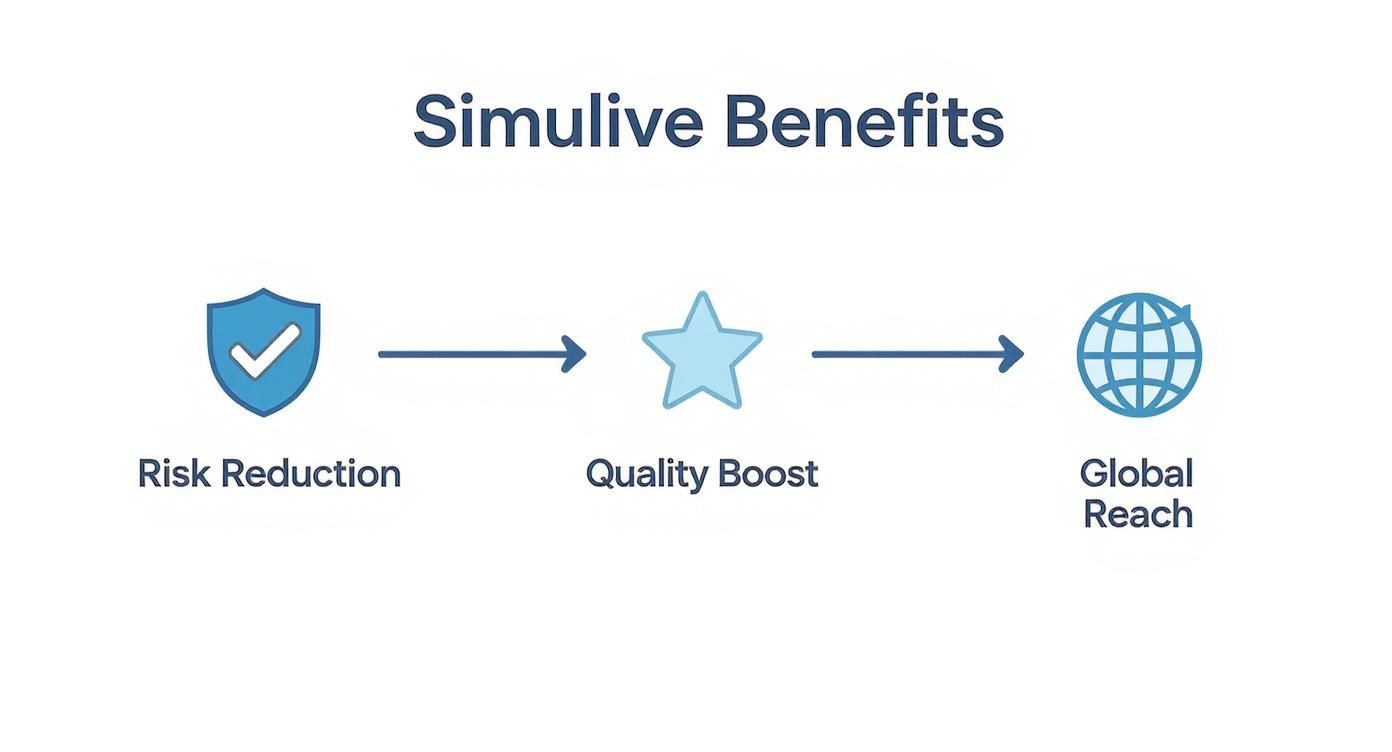
As the visual shows, every step in this process is designed to give you more control, leading to a more professional and accessible final broadcast.
Phase 4: Promotion and Live Management
With your event locked and loaded, the final piece is getting people to show up and then managing the experience while it's "live."
Start promoting your event across all your channels—email lists, social media, your website. You want to build some real anticipation, just like you would for a movie premiere.
When the broadcast starts, your work isn't done. The video plays on its own, but your team needs to be all-in on the live chat. This is the time to answer questions as they come up, run a few polls, and just engage with everyone in real-time. This active, human interaction is what makes the whole thing feel genuinely alive and interactive.
Creating Real-Time Engagement During Your Broadcast
The secret to a knockout recorded live stream isn't just about having a flawless video. The real magic happens in the chat—the lively, real-time conversation that unfolds alongside your content. While the video gives your event structure, it's the community interaction that gives it a soul. This is how you turn a simple broadcast into a vibrant, shared experience that truly feels alive.
Your audience isn't just passively watching a replay; they're showing up for an event. The goal is to make them feel seen, heard, and connected to something bigger. By shifting your team's focus from worrying about a fragile live feed to actively engaging in the chat, you unlock a much deeper level of connection with your viewers.
Make the Chat the Main Event
Think of your pre-recorded video as the main stage performance and the live chat as the interactive front row. To make that front row compelling, your team has to be right there with the audience—present, visible, and proactive. The aim is to foster an environment where conversation just flows naturally.
It's absolutely essential to have the host, speakers, or other subject matter experts jump into the chat. They can add extra context, answer questions as they pop up, and even pose questions back to the audience. This kind of direct access makes the whole experience feel exclusive and incredibly valuable.
The core principle here is simple: While your video content is one-to-many, the live chat experience should feel one-to-one. When your team is actively moderating and participating, every single viewer feels like they have a direct line to the experts.
Use Interactive Tools to Drive Participation
Modern streaming platforms are packed with tools designed to pull viewers out of a passive state and into active participation. Weaving these features into your broadcast plan is a must for keeping the energy high from start to finish.
A deep understanding of how to create engaging content is the foundation for using these tools effectively and keeping your audience hooked.
Here are a few tools that work wonders:
- Live Polls: Punctuate your stream with polls that tie directly into what's being discussed. You get instant feedback, and the audience feels like their opinions are part of the show.
- Timed Calls-to-Action (CTAs): Display clickable banners or links at just the right moment. You can point viewers to a resource download, a demo signup, or a relevant webpage precisely when it makes the most sense.
- Q&A Sessions: Carve out a specific segment for a "Live Q&A" where your team answers questions entirely within the chat. This creates a dedicated focal point for interaction and discussion.
Frame Your Event as a Premiere
The way you promote your event sets the tone. Don't just treat it like another video upload. You need to build excitement by framing it as a can't-miss premiere or an exclusive launch.
Use countdown timers on social media, send out "save the date" email reminders, and use language that builds a sense of urgency and shared anticipation. Platforms like YouTube have mastered this, partly because their features support this event-based model so well. To give you an idea of scale, YouTube generated an incredible 13.25 billion hours watched in the third quarter of 2025 alone, cementing its spot as the top destination for creators hosting these kinds of scheduled events.
When viewers show up expecting a live community experience, they're far more likely to dive right into the chat and become part of the action from the very beginning.
Common Simulive Mistakes and How to Avoid Them
Broadcasting a pre-recorded live stream gives you a fantastic safety net, sidestepping the unpredictable chaos of a truly live event. But don't get too comfortable—it's not completely foolproof. A few common missteps can easily make your polished broadcast feel flat, automated, and anything but live.
By far, the biggest mistake is treating it like a "set it and forget it" task. This approach completely misses the point.
This happens when a team just schedules the video to play and then walks away. The chat is silent, questions hang in the air unanswered, and your audience quickly realizes they're just watching a glorified YouTube premiere. That crucial sense of a shared, live community event completely evaporates, and you'll see your viewer count start to drop.
Another classic pitfall is simply not promoting the event enough. You could have the most amazing content in the world, but if nobody knows it's happening, you’re basically broadcasting to an empty room. This completely undermines the community feeling that makes a recorded live stream so powerful in the first place.
Neglecting Live Community Management
Let's be clear: just hitting "play" on a video isn't enough. The live part of a "recorded live stream" happens in the chat. Failing to have actual people—moderators, subject matter experts, or community managers—staffing your event is a massive oversight. Your audience shows up expecting to interact, and if they're met with dead air, you've broken that implicit promise.
The real magic of a simulive broadcast is the live conversation happening around your pre-recorded content. Without that active engagement, it’s just a scheduled replay, not an event.
You can easily dodge this bullet with a solid engagement plan:
- Assign Roles: Have team members dedicated to welcoming viewers, answering questions as they pop up, and sparking conversations.
- Prepare Talking Points: Give your team a list of key insights or pre-planned questions to drop in the chat. This keeps the discussion moving, especially during lulls.
- Engage Proactively: Don't just sit back and wait. Be the first to post comments and greet people by name as they join the stream.
Overlooking Technical Testing and Platform Choice
While you've eliminated the risk of an on-camera gaffe, technical gremlins can still ruin the show. A common error is failing to test the entire workflow, from the initial video upload to how it looks on every platform you're streaming to. Incorrect encoding settings or a simple compatibility issue can leave you with a pixelated, buffering mess.
Your choice of platform is also incredibly important. Some platforms, for instance, are built to handle massive, highly engaged audiences. Take Twitch, a giant in the gaming world, which averaged 2.4 million concurrent viewers at any given moment in 2024. This shows the kind of scale and stability that professional platforms provide. You can find more details on Twitch’s massive viewership on The Social Shepherd. If you pick a service that can't handle your viewer count or lacks the right engagement tools, your event will suffer.
The solution here is a simple pre-flight check. Always run a private test stream to make sure your video looks and sounds perfect. Double-check your chosen platform's technical requirements and, ideally, use a service built for reliable simulive broadcasting. Taking these steps is the difference between an engaging event and one that feels like a fake live stream.
Got Questions About Recorded Live Streams?
Even after you get the basic idea, a few practical questions always pop up when you're trying to decide if a recorded live stream is the right move for your event. It's a unique format that sits somewhere between a polished video and a live broadcast, so it's normal to wonder how it all works in practice, especially when it comes to audience interaction.
Let's tackle the questions I hear most often.
The biggest one? People worry that the event won't feel live. The secret is realizing where the "live" part actually happens: in the chat.
Can We Still Do a Live Q&A?
You bet. In fact, it's one of the best parts of this whole approach. The key is to have your speakers and subject matter experts join the event as audience members and jump right into the chat while the video plays.
This lets you answer questions the moment they're asked, creating a genuinely helpful and dynamic Q&A session. You're essentially getting the best of both worlds: a perfectly polished, error-free presentation on screen and the spontaneous, helpful interaction that makes a live event feel special.
Will It Feel Fake or Less Authentic?
Not at all, as long as you play your cards right. The authenticity of a simulive event doesn't come from the video; it comes from the real-time buzz happening in the community chat. If your team is in there answering questions, reacting to comments, and sparking conversations, the entire experience will feel incredibly vibrant and present.
Think of it this way: the feeling of "liveness" just moves from the person on camera to the entire community interacting together. This often creates an even more engaging and inclusive vibe for everyone watching.
What Kinds of Events Are Best for This?
The simulive format really shines anytime you need to deliver a crystal-clear message with high production value and zero room for error. It's built for high-stakes broadcasts where a technical glitch or a speaker flub just isn't an option.
A recorded live stream is a fantastic choice for:
- Product Launches: Make sure every new feature and key selling point lands perfectly.
- Major Company Announcements: Keep control of the narrative with a polished, unified message.
- In-Depth Training Webinars: Deliver clear, edited instructions without any technical hiccups.
- Investor Updates: Present precise financial data and strategic plans with total confidence.
- Virtual Conference Keynotes: Guarantee your main-stage sessions run without a hitch.
At the end of the day, if you want the "can't-miss" energy of a live broadcast without the stress and risk that comes with it, simulive is your answer.
Ready to run flawless live events without the anxiety? With Pre-recorded LiveStream, you can upload your perfectly edited video, schedule it to go live at the perfect moment, and put all your energy into engaging with your audience. See just how simple it is to get started at https://prerecordedlivestream.com.